Showing posts with label touch. Show all posts
Showing posts with label touch. Show all posts
Thursday, April 4, 2013
Nokia Asha 300 Price India Nokia Asha 300 Touch Type Mobile Features Specifications
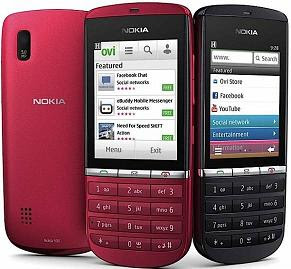
Nokia Asha 300 another Touch and Type Mobile by Nokia. The ongoing trend of Touch and Type mobiles are good. Nokia Asha 300 has 2.4 inches TFT resistive touchscreen display with alpha numeric keypad. The phone has 1 GHz powered processor with 128 MB RAM & 256 MB ROM. It has 140 MB Internal Memory while has microSD Card Slot up to 32GB Expandable Memory. Flash Lite Support is one of the unique feature in this phone. The phone has connectivity options includes 3G HSDPA, EGDE, GPRS, Bluetooth and USB port. Hence the Wifi Connectivity is not available in this phone. The 5 MP Camera, Multi Format Supported Audio and Video Player, FM Radio, Video Recording Option is also available on Nokia Asha 300.
Nokia Asha 300 Price in India:
Touch and Type Mobile Nokia Asha 300 price is around Rs. 7409 in India.
Colors:
Graphite, Night Shade, Gold, White Silver, Pink, Red
Nokia Asha 300 Features & Specifications:
- 2.4 Inches TFT Resistive Touchscreen with Resolution: 240 x 320 pixels
- Alpha Numeric Keypad
- 1GHz Processor
- 5.0 Mega Pixels Camera with Resolution: 2592 x 1944 pixels - Fixed focus
- Video recording: VGA@30fps
- Flash Lite support
- Video Player Supports MP4/H.264/H.263/WMV Format
- Audio Player Supports MP3/WAV/WMA/AAC Format
- Stereo FM radio with RDS
- 140 MB Internal Memory with 256 MB ROM and 128 MB RAM
- Expandable Memory: up to 32GB microSD Card slot
- Network: 2G GSM 850 / 900 / 1800 / 1900, 3G HSDPA 850 / 900 / 1900 / 2100
- Proximity Sensor for auto turn-off
- SMS(threaded view), MMS, Email, Push Email, IM
- GPRS and EDGE
- 3G HSDPA, 10.2 Mbps; HSUPA, 2 Mbps
- Bluetooth v2.1 with A2DP, EDR
- microUSB v2.0, HS
- Li-Ion 1110 mAh (BL-4U) Battery
- Stand by: Up to 550 hours on 2G / 597 hours on 3G
- Talk time: Up to 6 h 54 min on 2G / 4 hours 18 min on 3G
- Dimensions: 112.8 x 49.5 x 12.7 mm, 59 cc
- Weight: 85 g
- 3.5mm jack
- Loudspeaker
- Browser: WAP 2.0/xHTML, HTML
- Games + Downloadable
- SNS integration

Monday, March 25, 2013
How to Hard Reset HTC Touch Dual

Hard Reset Is a Resetting Technique Which Can Bring a Cell Phone To Its Original State When It Is Just Came From Factory; It Is Also Called Factory Resetting. There Are Many Reasons to Hard Reset a Cell Phone Such When a Cell Phone Becomes Very Slow, When Some Function Does Not Work, When Some Application Not Runs, When Some File Not Delete, When Application Not Uninstall And Many Unexpected Behavior By a Cell Phone.
HTC TOUCH DUAL Factory Resetting:
1. On the Home screen, slide to the Settings tab and then tap All Settings.
2. On the System tab, tap Clear Storage.
3. Enter “1234” and then tap Yes.
HARD RESETTING HTC TOUCH DUAL BY BUTTON:
1. Pull out the stylus.
2. Turned on, press and hold the VOLUME DOWN and ENTER buttons, then press the RESET button with the stylus tip.
3. Release the RESET button, but continue pressing the VOLUME DOWN and ENTER buttons until you see this message on the screen:
4. Release the VOLUME DOWN and ENTER buttons, then press the VOLUME UP button to perform the hard reset, or press any other button to cancel the reset.
Important:
* Please Do Not Hard Reset Your Mobile without Any Unrecoverable Difficulty.
** Hard Reset Will Erase All User Data from Your HTC Touch Dual.
So Keep In Mind To Back Up Your Important Data Before Hard Reset.
*** Please Fully Charge Your Phone Battery before Hard Reset Because Any Power Failure May Damage Mobile Permanently.
****Some Times Reset Can Damage Your Mobile.
You may also ask HTC Touch Dualhard reset as following also following:
HOW TO RESET A HTC TOUCH DUAL
HOW TO RESTORE A HTC TOUCH DUAL:
HOW TO FORMAT HTC TOUCH DUAL:
HOW TO MASTER RESET HTC TOUCH DUAL:
HOW TO FACTORY RESET HTC TOUCH DUAL:
HOW TO HARD RESET HTC TOUCH DUAL:
HOW TO FULL RESET A HTC TOUCH DUAL:
HOW TO FULL RESTORE A HTC TOUCH DUAL:
HOW TO MASTER RESTORE HTC TOUCH DUAL:
HOW TO MASTER RESET HTC TOUCH DUAL:
HOW TO FULL FACTORY RESET HTC TOUCH DUAL:
HOW TO HARD FORMAT HTC TOUCH DUAL:
Subscribe to:
Posts (Atom)